Transform Your Dumb Cameras into AI-Powered Guardians: GemmaGuardian's Dual AI Architecture
1. About this blog
Are you tired of getting false alerts from your security cameras every time a cat walks by or a tree branch moves in the wind?
If you find yourself in this situation, you’re not alone! 🚀. According to industry research, over 90% of security camera alerts are false positives - that’s right, 90%! This leads to alert fatigue where homeowners simply disable notifications, completely defeating the purpose of having a security system.

In this blog, I will cover the following topics:
🔹 Why your existing RTSP cameras are essentially “brain-dead”
🔹 Building an intelligent dual AI mode architecture for maximum flexibility
🔹 Leveraging Google’s Gemma models for context-aware threat detection
🔹 Designing a privacy-first, local-processing surveillance system
🔹 Creating a modular fallback system that adapts to hardware capabilities
🔹 Integrating mobile apps for real-time notifications and live streaming
2. The Problem: Millions of Dumb Cameras
We often overlook the fundamental limitation of traditional RTSP cameras. You might have spent $100-500 on a decent security camera, but here’s the harsh truth: it can only detect motion, not context. Your expensive camera can’t tell the difference between a burglar and your neighbor’s cat.
Homeowners and small businesses face an impossible choice:
| Challenge | Current Reality | Impact |
|---|---|---|
| Existing Cameras Are “Dumb” | Millions of RTSP cameras only detect motion, not context | Cameras become liability instead of asset |
| Enterprise AI Too Expensive | Professional solutions cost $10,000+ per camera + monthly fees | 99% of users priced out of intelligent surveillance |
| False Alert Overwhelm | 90%+ false positives from wind, shadows, animals | Users disable alerts, missing real threats |
| Cloud Privacy Concerns | Most solutions upload your footage to third-party servers | Your private property becomes someone else’s data |
The solution? Enter GemmaGuardian - a system that transforms your existing “dumb” RTSP cameras into AI-powered guardians without replacing a single piece of hardware.
3. The Architecture: Dual AI Mode Design
Now, let’s explore why a dual AI mode architecture is critical. When building AI-powered edge applications, you face a common challenge: hardware variability. Some users have powerful GPU setups, while others run on modest CPU-only systems. Some environments have stable GPU drivers, while others struggle with compatibility issues.
The complexity of supporting diverse hardware can make it challenging to deliver a consistent experience. A one-size-fits-all approach often fails when deployed across different environments.
A dual AI mode architecture addresses this by providing two distinct processing paths that users can choose based on their hardware capabilities and requirements. This ensures that the system works optimally regardless of the deployment environment.
Here’s how GemmaGuardian implements this architecture:
🌐 Ollama Mode (Server-Based Processing)
This is the recommended mode for production deployments. It leverages the power of Ollama server to orchestrate multiple Gemma models for sophisticated analysis:
|
|
Key Advantages:
- ✅ Optimal Performance: Server handles model loading and optimization
- ✅ Dual Model Power: Vision model analyzes frames, text model consolidates findings
- ✅ Production Ready: Stable, tested deployment architecture
- ✅ Resource Efficient: Models stay loaded in server memory
When to Use:
- Systems with stable GPU drivers and adequate VRAM (8GB+)
- Production environments requiring consistent performance
- Scenarios where Ollama server can run locally or on LAN
🔥 Transformer Mode (Direct Processing)
This is the fallback mode that provides complete independence from external dependencies:
|
|
Key Advantages:
- ✅ Maximum Compatibility: Works on CPU-only systems
- ✅ Zero Dependencies: No external servers required
- ✅ Edge Deployment: Perfect for resource-constrained environments
- ✅ GPU Driver Resilience: Bypasses driver compatibility issues
When to Use:
- GPU driver issues or compatibility problems
- Limited VRAM (4GB+ RAM sufficient)
- CPU-only environments
- Edge deployments with no server infrastructure
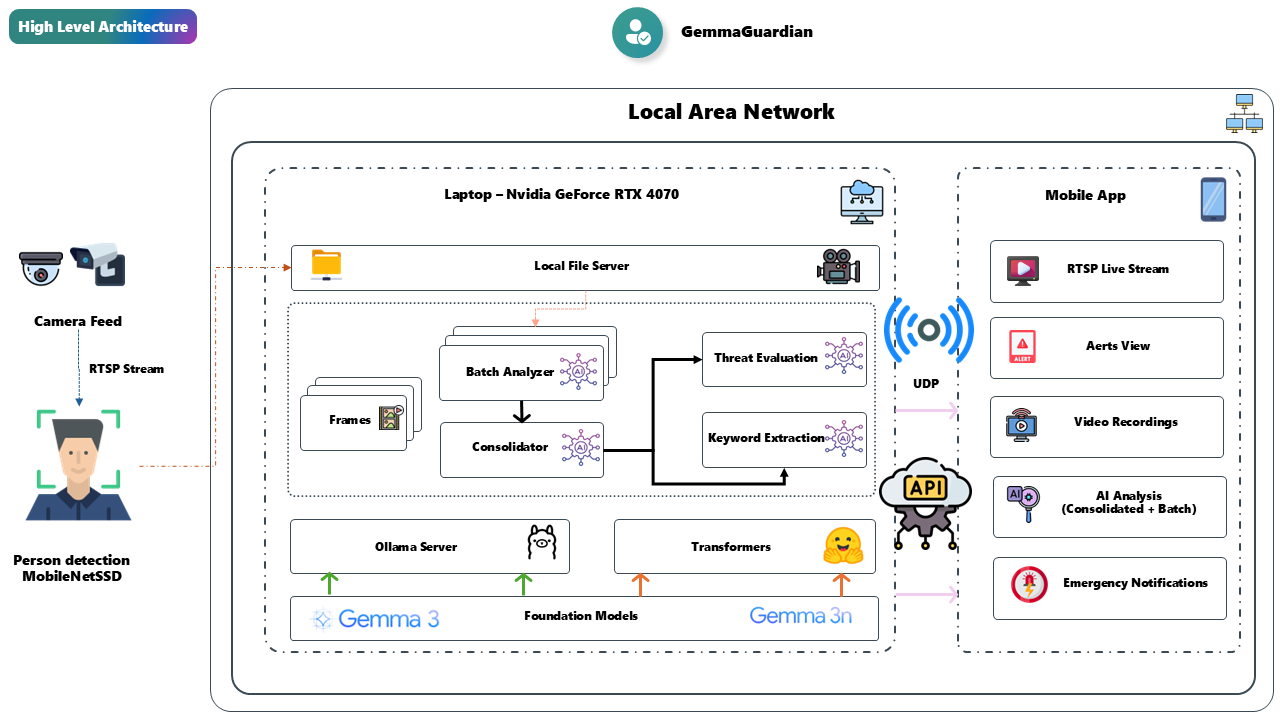
System Architecture Overview
4. Leveraging Google Gemma Models for Intelligent Analysis
The magic of GemmaGuardian lies in how it uses Google’s Gemma models to understand context, not just detect motion. Traditional cameras alert you when they see movement. GemmaGuardian tells you what is happening and why it matters.
Here’s the processing pipeline:
Step 1: Person Detection (MobileNet SSD)
Before we even think about AI analysis, we need to filter out non-human activity:
|
|
This simple check eliminates 90% of false positives immediately. No more alerts for cats, cars, or tree branches!

Step 2: Video Recording & Frame Extraction
Once a person is detected, we record a 60-second HD clip and extract frames every 2 seconds:
|
|
Step 3: AI Analysis with Gemma Models
Now comes the intelligent part. We batch frames (4 at a time) and send them to Gemma models for analysis:
Ollama Mode Implementation
|
|
Transformer Mode Implementation
|
|
Step 4: Intelligent Threat Classification
The AI doesn’t just describe what it sees - it classifies threats intelligently:
|
|
5. Privacy-First: Why Local Processing Matters
One of the most critical design decisions in GemmaGuardian is complete local processing. Your camera footage never leaves your network. Here’s why this matters:
🔒 Your Data, Your Network:
- All processing happens on your local machine or LAN
- RTSP streams stay within your network perimeter
- AI analysis runs locally (even in Ollama mode, server is local)
- No cloud uploads, no third-party data sharing
🚀 Performance Benefits:
- <100ms person detection latency
- 30-60s AI analysis time (no network overhead)
- No internet dependency for core functionality
- Works even when internet is down
💰 Cost Savings:
- No monthly cloud subscription fees
- No data transfer costs
- No per-camera licensing fees
- One-time setup, lifetime usage

6. Mobile Integration: Real-Time Alerts Done Right
A surveillance system is only as good as its notification system. GemmaGuardian includes a professional Android app that connects directly to your local network:
REST API Server
|
|
UDP Broadcast Notifications
For instant alerts, GemmaGuardian uses UDP broadcasts:
|
|
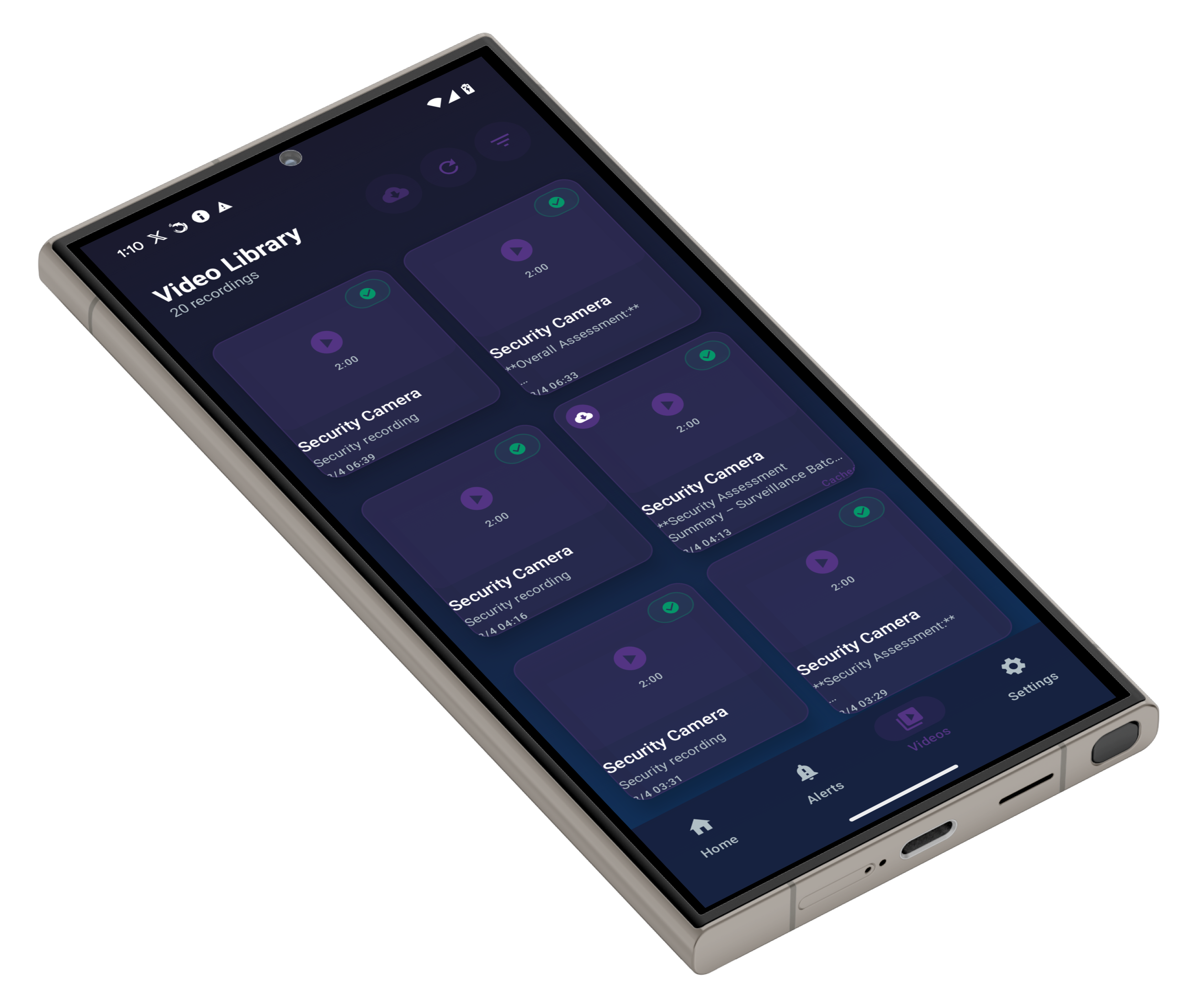
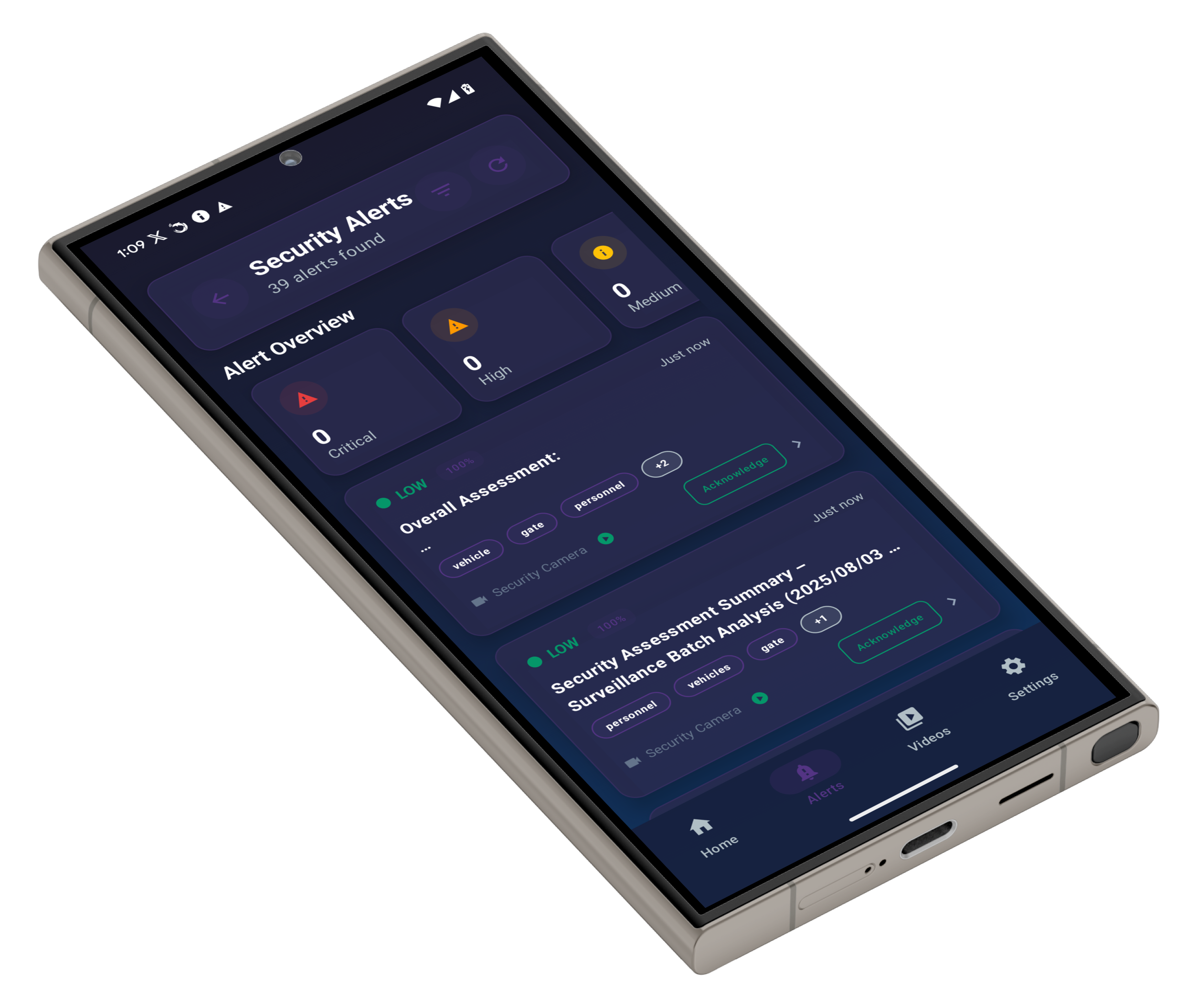
Mobile App Features
📱 Real-Time Dashboard:
- Live threat feed with threat level badges
- Instant notifications (< 2 second latency)
- Thumbnail previews of detection events
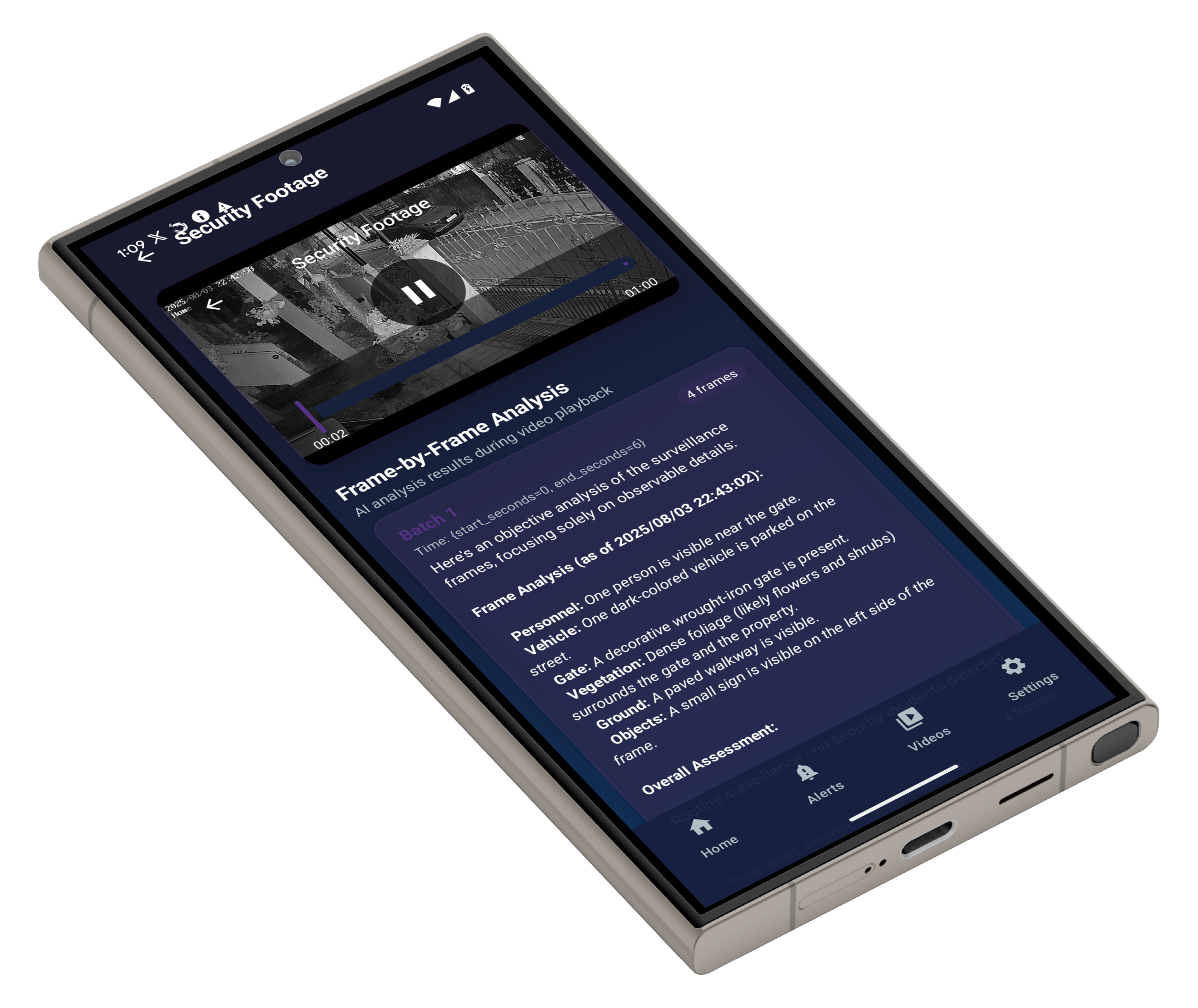
🎥 Video Playback:
- Full 60-second HD clips
- Frame-by-frame analysis view
- AI-highlighted suspicious moments
⚙️ Configuration:
- Adjust threat sensitivity
- Configure notification preferences
- Manage multiple cameras
Mobile App Screenshots
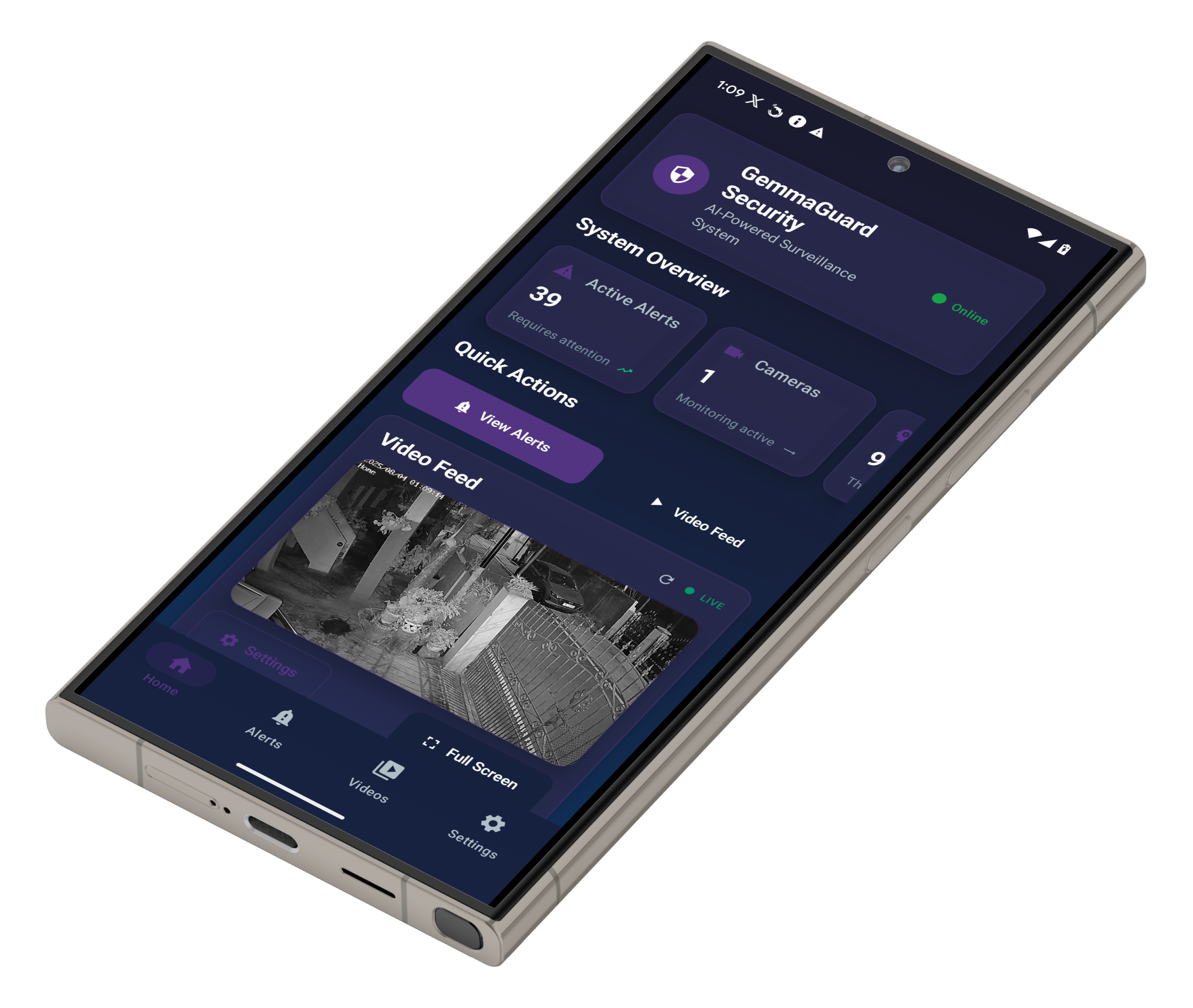
📱 Home Dashboard |
📹 Live Video Feed |
🚨 Alert Management |
🔍 Threat Details |
7. Deployment: One Command Setup
The beauty of GemmaGuardian is its simplicity. Despite the sophisticated architecture, deployment is incredibly straightforward:
|
|
The setup.py script handles everything:
✅ Virtual environment creation
✅ Dependency installation
✅ Model downloads (MobileNet SSD, Gemma models)
✅ AI mode configuration (guides you through Ollama vs Transformer choice)
✅ Firewall configuration (optional)
✅ System testing and validation
✅ Optional auto-launch
No complex configuration files, no manual model downloads, no dependency hell. Just run the script and start protecting your property.
8. Results: From Alert Fatigue to Peace of Mind
Let’s look at real-world improvements GemmaGuardian delivers:
Before GemmaGuardian
- False Positive Rate: 90%+ (motion detection only)
- User Action: Disable notifications due to alert fatigue
- Privacy: Camera footage uploaded to cloud
- Cost: $10-50/month per camera for cloud AI services
- Missed Threats: High (notifications disabled)
After GemmaGuardian
- False Positive Rate: <10% (AI-powered context awareness)
- User Action: Confident in threat assessments
- Privacy: 100% local processing, zero cloud uploads
- Cost: $0/month after one-time setup
- Missed Threats: Near zero (intelligent classification)

9. Real-World Example: Critical Threat Detection
Here’s what a typical GemmaGuardian alert looks like:
|
|
Compare this to a traditional motion alert: “Motion detected at rear door.”
Which one would you rather receive?
10. The Future: From Smart Cameras to Intelligent Guardians
GemmaGuardian represents a paradigm shift in home security. We’re moving from:
❌ Motion detection → ✅ Context understanding
❌ Cloud dependency → ✅ Local privacy
❌ Expensive hardware replacement → ✅ Software upgrade
❌ Alert fatigue → ✅ Actionable intelligence
The dual AI mode architecture ensures that regardless of your hardware setup - whether you’re running on a high-end GPU workstation or a modest CPU-only machine - you get intelligent surveillance that actually works.

11. Get Started Today
Transform your dumb cameras into AI-powered guardians:
🔗 GitHub Repository: https://github.com/Cloud-Jas/GemmaGuardian
📚 Documentation:
🚀 Quick Start:
|
|
Have questions about GemmaGuardian or want to share your deployment experience? Connect with me on LinkedIn or open an issue on GitHub. Let’s make home security intelligent and accessible for everyone!
If you find this post helpful, please consider sponsoring.
