How do you transform raw LiDAR point clouds into archaeological discovery tools using Python and Azure Container Apps?
LiDAR (Light Detection and Ranging) datasets contain millions of 3D points representing terrain surfaces. For archaeologists, these point clouds can reveal hidden structures, ancient settlements, and landscape modifications invisible to the naked eye. But processing raw LAS/LAZ files into actionable terrain models requires specialized geospatial tools and significant computational resources.
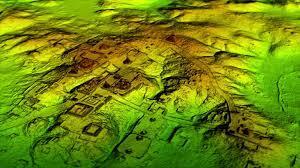
In Archaios, I built a Python-based LiDAR processing service that runs as Azure Container App Jobs, triggered by Durable Functions via Azure Storage Queues. The service generates Digital Terrain Models (DTM), Digital Surface Models (DSM), hillshade visualizations, and slope analysis — all optimized for archaeological feature detection.
In this blog, I’ll share the actual code powering Archaios’s LiDAR processing pipeline.
In this blog, I will cover the following topics:
🔹 Queue-based message processing from Durable Functions
🔹 LAS/LAZ file analysis with laspy and numpy
🔹 Archaeological DSM pipeline with PDAL-inspired processing
🔹 DTM/DSM generation from ground-classified point clouds
🔹 Hillshade and slope visualization for terrain analysis
🔹 Coordinate extraction and transformation (UTM to WGS84)
🔹 Raising external events back to Durable Functions
🔹 Azure Blob Storage integration for output artifacts
Processing archaeological LiDAR data involves several complex steps:
Stage 1: Data Ingestion
- Download large LAS/LAZ files from Azure Blob Storage
- Parse queue messages from Durable Functions
- Extract processing parameters (resolution, filters, etc.)
Stage 2: Point Cloud Processing
- Read millions of 3D points (X, Y, Z coordinates)
- Classify ground vs. non-ground points
- Apply noise filtering
- Extract geographic coordinates (lat/lon)
Stage 3: Terrain Model Generation
- Generate Digital Terrain Model (DTM) - bare earth surface
- Generate Digital Surface Model (DSM) - top surface including vegetation/structures
- Calculate hillshade from multiple light directions
- Compute slope angles
Stage 4: Visualization & Upload
- Convert raster TIFFs to colorized PNG images
- Upload visualizations to Azure Blob Storage
- Raise completion event back to Durable Functions with results
Traditional challenges:
❌ Memory constraints - LAS files can be 2-5GB with 50M+ points
❌ Processing time - Classification and rasterization can take 10-30 minutes
❌ Coordinate systems - Handling various UTM zones and CRS formats
❌ Archaeological optimization - Standard terrain models miss subtle features
Here’s how the LiDAR processor integrates with the overall Archaios architecture:
 1
 2
 3
 4
 5
 6
 7
 8
 9
10
11
12
13
14
|
[Durable Functions]
    ↓ (sends message)
[Azure Storage Queue: lidar-processing]
    ↓ (triggers)
[Container App Job: LiDARProcessor]
    ├─> Downloads LAS from Blob Storage
    ├─> Processes with PDAL pipeline
    ├─> Generates DTM/DSM/Hillshade/Slope
    ├─> Uploads results to Blob Storage
    └─> Raises event back to Durable Functions

[Durable Functions]
    ↓ (receives ProcessingResult)
[Continues orchestration...]
|
4. Main Entry Point: Queue Processing Service
The LiDARService is the core coordinator that processes messages from the Azure Storage Queue:
 1
 2
 3
 4
 5
 6
 7
 8
 9
10
11
12
13
14
15
16
17
18
19
20
21
22
23
24
25
26
27
28
29
30
31
32
33
34
|
import asyncio
import logging
from pathlib import Path
import tempfile
from infrastructure.blob_storage import AzureBlobStorage
from infrastructure.queue_storage import AzureQueueStorage
from services.event_service import DurableEventService
from services.lidar_service import LiDARService
from config import AppConfig

async def main():
    config = AppConfig.from_env()
    temp_dir = tempfile.mkdtemp()

    local_mode = config.local_mode

    logging.info(f"Starting LiDAR Processing Service in {'local' if local_mode else 'container'} mode")
    logging.getLogger('azure.core.pipeline.policies.http_logging_policy').setLevel(logging.WARNING)

    blob_storage = AzureBlobStorage(config.storage_connection)
    queue_storage = AzureQueueStorage(config.storage_connection, config.queue_name)
    event_service = DurableEventService(config)

    lidar_service = LiDARService(
        blob_storage,
        queue_storage,
        event_service,
        local_mode=local_mode
    )

    await lidar_service.run()

if __name__ == "__main__":
    asyncio.run(main())
|
The service reads configuration from environment variables (set by Container App):
 1
 2
 3
 4
 5
 6
 7
 8
 9
10
11
12
13
14
15
16
17
18
19
20
21
22
23
24
25
26
|
from dataclasses import dataclass
from dotenv import load_dotenv
import os

@dataclass
class AppConfig:
    storage_connection: str
    queue_name: str
    function_base_url: str
    task_hub: str
    connection_name: str
    system_key: str
    local_mode: bool = False

    @classmethod
    def from_env(cls):
        load_dotenv()
        return cls(
            storage_connection=os.getenv('AZURE_STORAGE_CONNECTION_STRING'),
            queue_name=os.getenv('QUEUE_NAME', 'lidar-processing'),
            function_base_url=os.getenv('FUNCTION_BASE_URL'),
            task_hub=os.getenv('TASK_HUB', 'LiDARHub'),
            connection_name=os.getenv('CONNECTION_NAME', 'Storage'),
            system_key=os.getenv('SYSTEM_KEY'),
            local_mode=os.getenv('LOCAL_MODE', 'false').lower() in ('true', 'yes', '1')
        )
|
The LiDARService.process_message method handles each queue message:
 1
 2
 3
 4
 5
 6
 7
 8
 9
10
11
12
13
14
15
16
17
18
19
20
21
22
23
24
25
26
27
28
29
30
31
32
33
34
35
36
37
38
39
40
41
42
43
44
45
46
47
48
49
50
51
52
53
54
55
56
57
58
59
60
61
|
async def process_message(self, message):
    try:
        decoded_text = base64.b64decode(message.content).decode('utf-8')
        logger.debug(f"Decoded message: {decoded_text}")
        data = json.loads(decoded_text)

        msg_data = ProcessingMessage(
            instance_id=data.get('InstanceId', ''),
            event_name=data.get('EventName', ''),
            blob_uri=data.get('BlobUri', ''),
            site_id=data.get('SiteId', ''),
            parameters=convert_dict_to_processing_params(data.get('Parameters'))
        )

        logger.info(f"Processing message for instance {msg_data.instance_id}")
        logger.info(f"Message data: {msg_data.__dict__}")

        with tempfile.NamedTemporaryFile(delete=False, suffix=Path(msg_data.blob_uri).suffix) as temp_file:
            await self.blob_storage.download_file(msg_data.blob_uri, temp_file.name)
            output_dir = tempfile.mkdtemp()

            event = (msg_data.event_name or "").strip()
            processing_result = ProcessingResult(status="error")

            if event == "LiDARProcessingCompleted":
                result_dict = await self._process_lidar_file(
                    temp_file.name,
                    output_dir,
                    msg_data.parameters,
                    msg_data.instance_id,
                    msg_data.site_id
                )
                processing_result = ProcessingResult(
                    status="success",
                    output_dir=output_dir,
                    statistics=result_dict.get("statistics", {}),
                    processing_details=result_dict.get("processing_details", {}),
                    lat=result_dict.get("lat", 0.0),
                    lon=result_dict.get("lon", 0.0),
                    dtmImage=result_dict.get("dtm_image"),
                    dsmImage=result_dict.get("dsm_image"),
                    hillshadeImage=result_dict.get("hillshade_image"),
                    hillshadeMultiDirectionalImage=result_dict.get("hillshade_multidirectional_image"),
                    slopeImage=result_dict.get("slope_image"),
                    historicalContext=result_dict.get("historical_context"),
                    systemPrompt=result_dict.get("system_prompt"),
                    elevationImage=result_dict.get("elevation_image")
                )

        await self.queue_storage.delete_message(message)
        await self.event_service.raise_completion_event(
            msg_data.instance_id,
            msg_data.event_name,
            processing_result.__dict__
        )

        logger.info(f"Message processed and deleted for instance {msg_data.instance_id}")

    except Exception as e:
        logger.error(f"Error processing message: {str(e)}")
        raise
|
✅ Base64 decoding - Queue messages are base64-encoded JSON
✅ Temporary file handling - Download to temp, process, cleanup
✅ Event-based routing - Different handlers for LiDAR vs. E57 vs. Raster
✅ Automatic cleanup - Delete queue message after successful processing
After processing completes, the service notifies Durable Functions using the external event API:
 1
 2
 3
 4
 5
 6
 7
 8
 9
10
11
12
13
14
15
16
17
18
|
import aiohttp
from core.interfaces import IEventService
from config import AppConfig

class DurableEventService(IEventService):
    def __init__(self, config: AppConfig):
        self.config = config

    async def raise_completion_event(self, instance_id: str, event_name: str, result: dict) -> None:
        url = (f"{self.config.function_base_url}/runtime/webhooks/durabletask/instances/{instance_id}/"
               f"raiseEvent/{event_name}?"
               f"connection={self.config.connection_name}&"
               f"code={self.config.system_key}")

        async with aiohttp.ClientSession() as session:
            async with session.post(url, json=result) as response:
                if response.status != 202:
                    print(f"Failed to raise event: {response.status}, {await response.text()}")
|
This calls the Durable Functions HTTP API:
1
2
3
4
5
6
7
8
9
|
POST https://<function-app>.azurewebsites.net/runtime/webhooks/durabletask/instances/{instanceId}/raiseEvent/{eventName}?connection=Storage&code={systemKey}

Body: {
  "status": "success",
  "lat": 52.3456,
  "lon": -1.2345,
  "dtmImage": "https://...blob.../dtm.png",
  "statistics": { ... }
}
|
The orchestrator, waiting with WaitForExternalEvent, immediately resumes!
The core processing happens in run_archaeological_dsm_pipeline:
 1
 2
 3
 4
 5
 6
 7
 8
 9
10
11
12
13
14
15
16
17
18
19
20
21
22
23
24
25
26
27
28
29
30
31
32
33
34
35
36
37
38
39
40
41
42
43
44
45
46
47
48
49
50
51
52
53
54
55
56
57
58
59
60
61
62
63
64
65
66
67
68
69
70
71
72
73
74
75
76
77
78
79
80
81
82
83
84
85
86
87
88
89
|
def run_archaeological_dsm_pipeline(
    site_id,
    file_path,
    output_dir,
    lat,
    lon,
    resolution=0.5,
    dtm_resolution=0.5,
    dsm_resolution=0.5,
    parameters=None
):
    """
    Full archaeological processing pipeline:
    1. Read LAS file
    2. Filter noise (optional)
    3. Classify ground points
    4. Generate DTM from ground points
    5. Generate DSM from all points
    6. Generate hillshade visualizations
    7. Generate slope analysis
    8. Convert to colorized PNGs
    9. Extract coordinates
    """

    logger.info(f"Starting archaeological DSM pipeline for {file_path}")

    # Step 1: Read LAS file
    reader = LiDARReader()
    las = reader.read(file_path)

    # Step 2: Check for existing ground classification
    if has_ground_classification(las):
        logger.info("File has existing ground classification, skipping classifier")
        classified_las_path = file_path
    else:
        # Step 3: Apply ground classifier
        logger.info("Applying ground classifier")
        classifier = GroundClassifier(
            cell_size=parameters.ground_classifier_cell_size if parameters else 1.0,
            slope=parameters.ground_classifier_slope if parameters else 0.15,
            max_distance=parameters.ground_classifier_max_distance if parameters else 2.5,
            iterations=parameters.ground_classifier_iterations if parameters else 5
        )
        classified_las_path = classifier.classify(file_path, str(Path(output_dir) / "classified.las"))

    # Step 4: Generate DTM (ground points only)
    dtm_generator = DTMGenerator(resolution=dtm_resolution)
    dtm_tif = dtm_generator.generate(classified_las_path, str(Path(output_dir) / "dtm.tif"))

    # Step 5: Generate DSM (all points)
    dsm_generator = DSMGenerator(resolution=dsm_resolution)
    dsm_tif = dsm_generator.generate(classified_las_path, str(Path(output_dir) / "dsm.tif"))

    # Step 6: Generate hillshade
    hillshade_gen = HillshadeGenerator(
        azimuth=parameters.hillshade_azimuth if parameters else 315,
        altitude=parameters.hillshade_altitude if parameters else 45,
        z_factor=parameters.hillshade_z_factor if parameters else 1.0
    )
    hillshade_tif = hillshade_gen.generate(dtm_tif, str(Path(output_dir) / "hillshade.tif"))

    # Step 7: Generate multi-directional hillshade (reveals features from all angles)
    hillshade_multi_gen = HillshadeMultiDirectionalGenerator()
    hillshade_multi_tif = hillshade_multi_gen.generate(dtm_tif, str(Path(output_dir) / "hillshade_multidirectional.tif"))

    # Step 8: Generate slope
    slope_analyzer = SlopeAnalyzer()
    slope_tif = slope_analyzer.analyze(dtm_tif, str(Path(output_dir) / "slope.tif"))

    # Step 9: Convert TIFFs to colorized PNGs
    tif_to_image(dtm_tif, str(Path(output_dir) / "dtm.png"), colormap='terrain')
    tif_to_image(dsm_tif, str(Path(output_dir) / "dsm.png"), colormap='terrain')
    tif_to_image(hillshade_tif, str(Path(output_dir) / "hillshade.png"), colormap='gray')
    tif_to_image(hillshade_multi_tif, str(Path(output_dir) / "hillshade_multidirectional.png"), colormap='gray')
    tif_to_image(slope_tif, str(Path(output_dir) / "slope.png"), colormap='hot')

    # Step 10: Extract lat/lon from LAS file
    extracted_lat, extracted_lon = extract_latlon_from_las(las, Path(file_path).name)

    return {
        "lat": extracted_lat,
        "lon": extracted_lon,
        "dtm_image": str(Path(output_dir) / "dtm.png"),
        "dsm_image": str(Path(output_dir) / "dsm.png"),
        "hillshade_image": str(Path(output_dir) / "hillshade.png"),
        "hillshade_multidirectional_image": str(Path(output_dir) / "hillshade_multidirectional.png"),
        "slope_image": str(Path(output_dir) / "slope.png"),
        "statistics": { ... }  # Statistics from LAS analysis
    }
|
One critical feature is extracting geographic coordinates from LAS files. Many LAS files use UTM coordinate systems:
 1
 2
 3
 4
 5
 6
 7
 8
 9
10
11
12
13
14
15
16
17
18
19
20
21
22
23
24
25
26
27
28
29
30
31
32
33
34
35
36
37
38
39
40
41
42
43
44
45
46
|
def extract_latlon_from_las(las, filename):
    """
    Extract latitude/longitude from LAS file.
    Supports files with embedded CRS or falls back to survey code mapping if CRS missing.
    """
    # Calculate center of point cloud
    min_x, max_x = np.min(las.x), np.max(las.x)
    min_y, max_y = np.min(las.y), np.max(las.y)
    center_x = (min_x + max_x) / 2
    center_y = (min_y + max_y) / 2

    # Try to get CRS from LAS header
    try:
        las_crs = las.header.parse_crs()
        if las_crs:
            crs_epsg = las_crs.to_epsg()
            print(f"Detected CRS EPSG:{crs_epsg}")
            transformer = Transformer.from_crs(f"EPSG:{crs_epsg}", "EPSG:4326", always_xy=True)
            lon, lat = transformer.transform(center_x, center_y)
            return float(lat), float(lon)
    except Exception as e:
        print(f"Could not read CRS: {e}")

    # Fallback: use survey filename to determine UTM zone
    survey_key, survey_code = extract_survey_key_and_code(filename)

    zone = None
    if survey_key in survey_to_zone:
        zone = survey_to_zone[survey_key]
    else:
        # Try matching by survey code prefix
        for key in survey_to_zone:
            if key.startswith(survey_code):
                zone = survey_to_zone[key]
                print(f"Using fallback UTM Zone {zone}S from survey code prefix {survey_code}")
                break

    if zone:
        transformer = Transformer.from_crs(f"EPSG:327{zone}", "EPSG:4326", always_xy=True)
        lon, lat = transformer.transform(center_x, center_y)
        return float(lat), float(lon)

    print(f"Survey code '{survey_code}' not found. Falling back to EPSG:32720 (UTM 20S)")
    transformer = Transformer.from_crs("EPSG:32720", "EPSG:4326", always_xy=True)
    lon, lat = transformer.transform(center_x, center_y)
    return float(lat), float(lon)
|
This handles:
✅ CRS auto-detection - Read from LAS header when available
✅ Filename-based fallback - Parse survey codes like “BON_A01_2013” → UTM Zone 19S
✅ Default fallback - Use common zone if nothing else works
The LASAnalyzer provides detailed statistics about the point cloud:
 1
 2
 3
 4
 5
 6
 7
 8
 9
10
11
12
13
14
15
16
17
18
19
20
21
22
23
24
25
26
27
28
29
30
31
32
33
34
35
36
|
import laspy
import numpy as np

class LASAnalyzer:
    def analyze_file(self, las_path: str) -> ProcessingResult:
        las = laspy.read(las_path)

        if hasattr(las, 'classification'):
            ground_points = np.where(las.classification == 2)[0]
            non_ground_points = np.where(las.classification != 2)[0]

        stats = {
            "total_points": len(las.points),
            "point_format": las.header.point_format.id,
            "ground_points": len(ground_points) if 'ground_points' in locals() else 0,
            "non_ground_points": len(non_ground_points) if 'non_ground_points' in locals() else 0,
            "ground_coverage_percent": (len(ground_points) / len(las.points) * 100) if 'ground_points' in locals() else 0,
            "has_classification": hasattr(las, 'classification'),
            "has_return_num": hasattr(las, 'return_num'),
            "has_intensity": hasattr(las, 'intensity'),
            "elevation_stats": {
                "min": float(np.min(las.z)),
                "max": float(np.max(las.z)),
                "mean": float(np.mean(las.z)),
                "std": float(np.std(las.z))
            }
        }

        return ProcessingResult(
            status="success",
            statistics=stats,
            processing_details={
                "format_version": str(las.header.version),
                "crs": str(las.header.parse_crs()) if hasattr(las.header, 'parse_crs') else "Unknown"
            }
        )
|
This tells us:
- Total point count (e.g., 15,234,567 points)
- Ground vs. non-ground classification
- Elevation range and statistics
- Available attributes (intensity, return number, etc.)
After generating GeoTIFF rasters, we convert them to colorized PNG images for visualization:
 1
 2
 3
 4
 5
 6
 7
 8
 9
10
11
12
13
14
15
16
17
18
19
20
21
22
23
24
25
26
27
28
29
30
31
32
33
34
35
36
37
38
39
40
41
42
43
44
45
|
def tif_to_image(
    tif_path,
    out_image_path,
    colormap='terrain',
    transparent_nodata=True
):
    """
    Converts a single-band GeoTIFF into a colorized PNG with optional colormap and transparency.
    """
    with rasterio.open(tif_path) as src:
        arr = src.read(1, masked=True)

        if arr.mask.all():
            logger.warning(f"All pixels are nodata in {tif_path}, generating blank image.")
            blank_img = Image.new("RGBA", arr.shape[::-1], (255, 255, 255, 0))
            blank_img.save(out_image_path)
            return str(out_image_path)

        valid_data = arr.compressed()
        arr_min, arr_max = valid_data.min(), valid_data.max()
        logger.info(f"Normalizing {tif_path}: min={arr_min}, max={arr_max}")

        # Normalize to 0-1 range
        norm = np.zeros_like(arr, dtype=np.float32)
        if arr_max > arr_min:
            mask = ~arr.mask
            norm[mask] = (arr[mask] - arr_min) / (arr_max - arr_min)

        # Apply colormap
        cmap = cm.get_cmap(colormap)
        colored = cmap(norm)

        # Convert to 8-bit RGBA
        rgba = (colored * 255).astype(np.uint8)

        # Handle transparency for nodata
        if transparent_nodata:
            rgba[arr.mask, 3] = 0  # Set alpha to 0 for nodata pixels

        # Save as PNG
        img = Image.fromarray(rgba)
        img.save(out_image_path)
        logger.info(f"Saved colorized image to {out_image_path}")

        return str(out_image_path)
|
Colormap options:
- terrain - DTM/DSM (brown→green→white for elevation)
- gray - Hillshade (black→white for shading)
- hot - Slope (black→red→yellow→white for steepness)
After generating PNGs, the service uploads them to Azure Blob Storage:
 1
 2
 3
 4
 5
 6
 7
 8
 9
10
|
async def _upload_file(self, file_path, blob_name):
    """Upload a file to blob storage and return its URL."""
    try:
        container_name = "uploads"
        blob_url = await self.blob_storage.upload_file(file_path, container_name, blob_name)
        logger.info(f"Successfully uploaded {file_path} to {blob_url}")
        return blob_url
    except Exception as e:
        logger.error(f"Error uploading file {file_path}: {str(e)}")
        return None
|
The blob URLs are included in the ProcessingResult sent back to Durable Functions:
1
2
3
4
5
6
7
8
|
result = {
    "dtm_image": "https://storage.blob.core.windows.net/uploads/site123/dtm.png",
    "dsm_image": "https://storage.blob.core.windows.net/uploads/site123/dsm.png",
    "hillshade_image": "https://storage.blob.core.windows.net/uploads/site123/hillshade.png",
    "lat": 52.3456,
    "lon": -1.2345,
    "statistics": { ... }
}
|
The service runs as a Docker container in Azure Container Apps:
 1
 2
 3
 4
 5
 6
 7
 8
 9
10
11
12
13
14
15
16
17
18
19
|
FROM python:3.11-slim

ENV PYTHONDONTWRITEBYTECODE=1
ENV PYTHONUNBUFFERED=1

WORKDIR /app

RUN apt-get update && apt-get install -y \
    gcc \
    g++ \
    libgdal-dev \
    && rm -rf /var/lib/apt/lists/*

COPY requirements.txt .
RUN pip install --upgrade pip && pip install -r requirements.txt

COPY . .

CMD ["python", "main.py"]
|
Key dependencies:
laspy - LAS/LAZ file readingnumpy - Numerical processingrasterio - GeoTIFF I/Opyproj - Coordinate transformationsPillow - Image generationaiohttp - HTTP client for event raisingazure-storage-blob - Blob Storage SDKazure-storage-queue - Queue Storage SDK
After processing hundreds of LiDAR datasets in Archaios, here are the key benefits:
✅ Scalability - Container Apps auto-scale based on queue depth
✅ Isolation - Each job runs in its own container with dedicated resources
✅ Cost-effective - Only pay for actual processing time, not idle capacity
✅ Resilience - Failed jobs can retry without affecting orchestration
✅ Flexibility - Easy to update processing logic by deploying new container image
✅ Observable - Logs stream to Azure Monitor for debugging

Here’s what the pipeline generates from a typical archaeological LiDAR dataset:
Input: site_survey_2024.las (2.3GB, 42 million points)
Processing Time: ~18 minutes
Outputs:
dtm.png - Digital Terrain Model (bare earth, 0.5m resolution)dsm.png - Digital Surface Model (includes vegetation)hillshade.png - Single-direction hillshade (azimuth 315°)hillshade_multidirectional.png - Multi-angle compositeslope.png - Slope analysis (degrees)
Discovered Features:
- 3 potential burial mounds (elevated 1.2-1.8m above terrain)
- 1 rectilinear enclosure (45m × 30m)
- Ancient trackway (visible in slope analysis)
All discovered automatically by the AI agents in the next pipeline stage!
Ready to build LiDAR processing pipelines with Python and Azure Container Apps?
🔗 GitHub Repository: https://github.com/Cloud-Jas/Archaios
📚 Key Files to Study:
🚀 Quick Start:
1
2
3
4
|
git clone https://github.com/Cloud-Jas/Archaios.git
cd Archaios/src/backend/Archaios.AI.LiDARProcessor
pip install -r requirements.txt
python main.py
|
Processing LiDAR point clouds with Python and Azure Container Apps enables scalable, cost-effective geospatial analysis. If you’re working with remote sensing data or building GIS workflows, let’s connect on LinkedIn!
#Python #LiDAR #AzureContainerApps #Geospatial #PDAL #Archaeology #PointCloud #MicrosoftMVP
