1. How Archaios Processes LiDAR and Satellite Data
Archaios uses Python services running in Azure Container Apps to process LiDAR point clouds and fetch satellite imagery. These services are event-driven — they spin up when needed, process data, and scale back to zero when idle.
Here’s the flow:
 1
 2
 3
 4
 5
 6
 7
 8
 9
10
11
12
13
|
User Upload (LiDAR file)
    ↓
Durable Functions Orchestrator
    ↓
📮 Azure Storage Queue: "lidar-processing"
    ↓
🐳 Container App (Python service) - Auto-scales based on queue depth
    ↓
Processing (PDAL → DSM/DTM/Hillshade)
    ↓
🔔 Raise External Event back to orchestrator
    ↓
Continue workflow (Multi-Agent AI analysis)
|
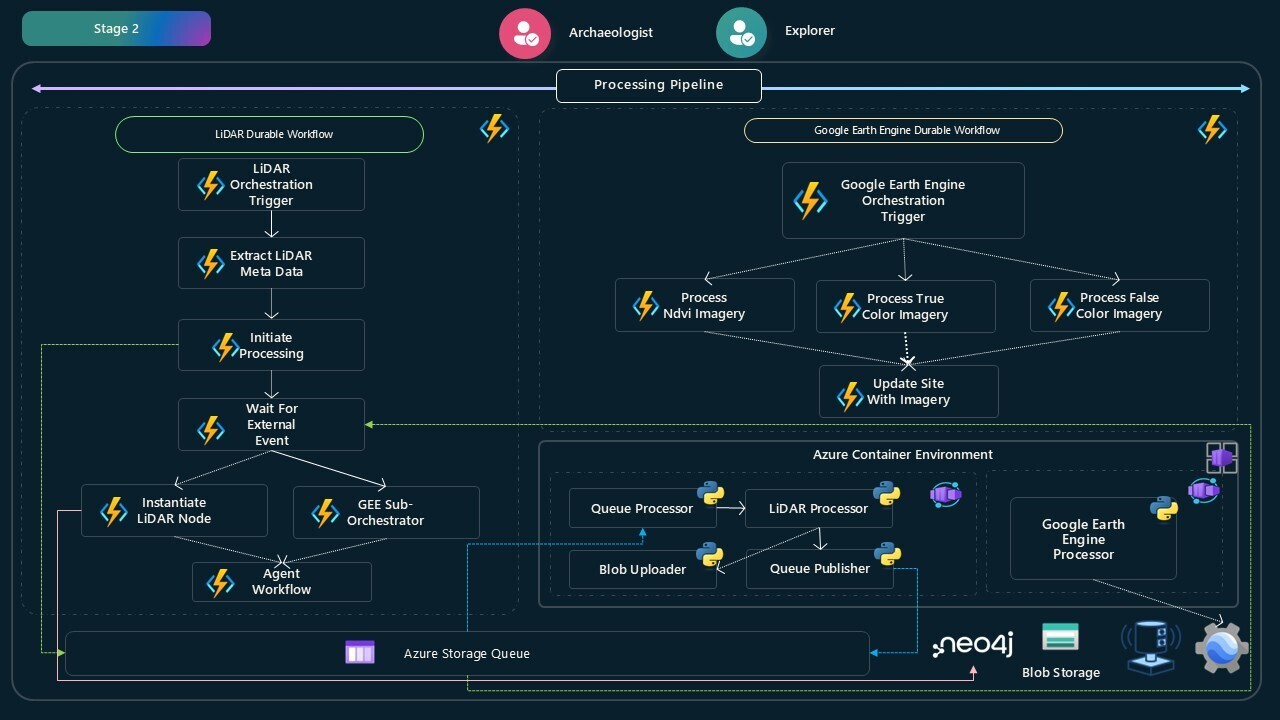
Two Python services run in Container Apps:
🔹 LiDARProcessor - Queue-driven job that processes point clouds (PDAL/GDAL)
🔹 GeeProcessor - HTTP microservice that fetches satellite imagery (Google Earth Engine)
I chose Container Apps because:
- Python services need heavy dependencies (PDAL, GDAL) that don’t fit in Azure Functions
- LiDAR processing takes 8-15 minutes per file (longer than Functions timeout)
- Upload patterns are unpredictable — need auto-scaling that costs $0 when idle
The LiDARProcessor runs as a Container App Job that polls an Azure Storage Queue. When the Durable Functions orchestrator needs to process a LiDAR file, it publishes a message to the queue. The Container App picks it up, processes the file, and raises an event back to the orchestrator.
 1
 2
 3
 4
 5
 6
 7
 8
 9
10
11
12
13
14
15
16
17
18
19
20
21
22
23
24
25
26
27
28
29
30
31
32
33
34
35
36
|
# main.py - Container App starts here
import asyncio
import logging
import tempfile
from config import AppConfig
from infrastructure.blob_storage import AzureBlobStorage
from infrastructure.queue_storage import AzureQueueStorage
from services.event_service import DurableEventService
from services.lidar_service import LiDARService

async def main():
    config = AppConfig.from_env()
    temp_dir = tempfile.mkdtemp()

    local_mode = config.local_mode

    logging.info(f"Starting LiDAR Processing Service in {'local' if local_mode else 'container'} mode")
    logging.getLogger('azure.core.pipeline.policies.http_logging_policy').setLevel(logging.WARNING)

    # Initialize Azure services
    blob_storage = AzureBlobStorage(config.storage_connection)
    queue_storage = AzureQueueStorage(config.storage_connection, config.queue_name)
    event_service = DurableEventService(config)

    # Start LiDAR processing service
    lidar_service = LiDARService(
        blob_storage,
        queue_storage,
        event_service,
        local_mode=local_mode
    )

    await lidar_service.run()

if __name__ == "__main__":
    asyncio.run(main())
|
The service:
- Reads configuration from environment variables (Container App sets these)
- Initializes connections to Azure Storage (blobs and queues)
- Starts the queue polling loop in
LiDARService.run()
 1
 2
 3
 4
 5
 6
 7
 8
 9
10
11
12
13
14
15
16
17
18
19
20
|
# services/lidar_service.py (simplified)
class LiDARService:
    async def run(self):
        """Main processing loop - polls queue and processes messages"""
        logger.info(f"Event-driven job started in {'local' if self.local_mode else 'container'} mode.")

        while True:
            try:
                # Get message from queue (visibility timeout: 300s)
                message = await self.queue_storage.get_message(visibility_timeout=300)

                if message:
                    await self.process_message(message)
                else:
                    logger.info("No messages in queue. Waiting...")
                    await asyncio.sleep(10)  # Poll every 10 seconds

            except Exception as e:
                logger.error(f"Error in processing loop: {e}")
                await asyncio.sleep(30)
|
Key design:
- Visibility timeout (300s): Message is hidden from other workers for 5 minutes during processing
- Long polling: Sleep 10s if no messages (reduces API calls)
- Continuous loop: Container keeps running until manually stopped
 1
 2
 3
 4
 5
 6
 7
 8
 9
10
11
12
13
14
15
16
17
18
19
20
21
22
23
24
25
26
27
28
29
30
31
32
33
|
async def process_message(self, message):
    """Process a single queue message"""
    try:
        data = json.loads(message.content)
        lidar_blob_url = data["lidarBlobUrl"]
        instance_id = data["instanceId"]

        logger.info(f"Processing LiDAR file: {lidar_blob_url}")

        # Download LiDAR file from blob storage
        local_file_path = await self.blob_storage.download_file(lidar_blob_url)

        # Generate archaeological outputs using PDAL
        results = await self.generate_archaeological_outputs(local_file_path)

        # Upload results back to blob storage
        output_urls = await self.upload_results(results)

        # Notify orchestrator that processing is complete
        await self.event_service.raise_event(
            instance_id=instance_id,
            event_name="LiDARProcessingComplete",
            event_data=output_urls
        )

        # Delete message from queue (success)
        await self.queue_storage.delete_message(message)

        logger.info(f"✅ LiDAR processing complete for {instance_id}")

    except Exception as e:
        logger.error(f"❌ Failed to process message: {e}")
        # Message will reappear in queue after visibility timeout
|
The processing flow:
- Parse queue message (contains blob URL and orchestration instance ID)
- Download LiDAR file from blob storage
- Run PDAL pipelines to generate DSM, DTM, hillshade, slope
- Upload results back to blob storage
- Call Durable Functions webhook to raise “LiDARProcessingComplete” event
- Delete message from queue
The critical part: how does the Container App tell the orchestrator it’s done?
 1
 2
 3
 4
 5
 6
 7
 8
 9
10
11
12
13
14
15
16
17
18
19
20
21
22
23
24
25
26
27
28
29
30
|
# services/event_service.py
import aiohttp
import json
import logging

class DurableEventService:
    def __init__(self, config):
        self.durable_endpoint = config.durable_functions_endpoint
        self.durable_code = config.durable_functions_code

    async def raise_event(self, instance_id: str, event_name: str, event_data: dict):
        """
        Raises an external event to Durable Functions orchestrator

        Args:
            instance_id: Orchestration instance ID (from queue message)
            event_name: Event name (e.g., "LiDARProcessingComplete")
            event_data: JSON-serializable data to send
        """
        url = f"{self.durable_endpoint}/runtime/webhooks/durabletask/instances/{instance_id}/raiseEvent/{event_name}"

        params = {"code": self.durable_code}
        headers = {"Content-Type": "application/json"}

        async with aiohttp.ClientSession() as session:
            async with session.post(url, params=params, headers=headers, json=event_data) as response:
                if response.status == 202:
                    logging.info(f"✅ Event '{event_name}' raised for instance {instance_id}")
                else:
                    logging.error(f"❌ Failed to raise event: {response.status}")
|
The Container App calls the Durable Functions webhook to unblock the orchestrator.
Back in the orchestrator (from Blog 1):
1
2
3
4
|
// Orchestrator waits for Container App to finish
var lidarResult = await context.WaitForExternalEvent<LiDARProcessingResult>("LiDARProcessingComplete");

_logger.LogInformation($"Received LiDAR processing results: {lidarResult.DsmUrl}");
|
This is decoupled communication: Container App doesn’t know about orchestration logic — it just raises an event with results.
LiDAR processing requires PDAL and GDAL — native C++ libraries. Docker makes this easy:
 1
 2
 3
 4
 5
 6
 7
 8
 9
10
11
12
13
14
15
16
17
18
19
20
21
22
23
|
FROM python:3.11-slim

ENV PYTHONDONTWRITEBYTECODE=1
ENV PYTHONUNBUFFERED=1

WORKDIR /app

# Install system dependencies for PDAL/GDAL
RUN apt-get update && apt-get install -y \
    gcc \
    g++ \
    libgdal-dev \
    && rm -rf /var/lib/apt/lists/*

# Install Python dependencies
COPY requirements.txt .
RUN pip install --upgrade pip && pip install -r requirements.txt

# Copy application code
COPY . .

# Run the service
CMD ["python", "main.py"]
|
What’s included:
python:3.11-slim - Minimal base imagegcc and g++ - Required to compile PDAL Python bindingslibgdal-dev - GDAL library for geospatial operations- No
EXPOSE directive - Container App Jobs don’t listen on ports
The GeeProcessor is different — it runs as a long-running HTTP microservice instead of a queue job.
 1
 2
 3
 4
 5
 6
 7
 8
 9
10
11
12
13
14
15
16
17
18
19
20
21
22
23
24
25
|
# main.py for GEE Processor
from fastapi import FastAPI, BackgroundTasks
from processors.gee_processor import GeeProcessor
import uvicorn

app = FastAPI(title="Archaios GEE Processor")

@app.post("/process/ndvi")
async def process_ndvi(request: ProcessRequest, background_tasks: BackgroundTasks):
    """Generate NDVI satellite imagery"""
    processor = GeeProcessor()
    result = await processor.process_ndvi(
        center_lat=request.latitude,
        center_lon=request.longitude,
        instance_id=request.instance_id
    )
    return result

@app.post("/process/truecolor")
async def process_truecolor(request: ProcessRequest):
    """Generate TrueColor satellite imagery"""
    # Similar pattern...

if __name__ == "__main__":
    uvicorn.run(app, host="0.0.0.0", port=8000)
|
Why HTTP instead of queue?
The Durable Functions orchestrator calls three GEE endpoints in parallel:
/process/ndvi - Vegetation stress analysis/process/truecolor - Visual context imagery/process/falsecolor - Infrared composite
Using HTTP means:
- Immediate response (no queue delay)
- Parallel processing (all three requests at once)
- Stateless design (each request is independent)
The Dockerfile for GEE Processor:
 1
 2
 3
 4
 5
 6
 7
 8
 9
10
11
12
13
14
15
16
17
18
19
20
21
22
23
24
25
26
27
28
|
FROM python:3.11-slim

ENV PYTHONDONTWRITEBYTECODE=1
ENV PYTHONUNBUFFERED=1
WORKDIR /app

# Install system dependencies
RUN apt-get update && apt-get install -y \
    gcc \
    libgdal-dev \
    curl \
    && rm -rf /var/lib/apt/lists/*

# Install Python dependencies
COPY requirements.txt .
RUN pip install --upgrade pip && pip install -r requirements.txt

# Copy application code
COPY . .

# Copy Google Earth Engine service account credentials
COPY gee-service-account.json .

# Expose HTTP port
EXPOSE 8000

# Run FastAPI server
CMD ["python", "main.py"]
|
Key differences:
EXPOSE 8000 - Container accepts HTTP trafficgee-service-account.json - GEE authentication file- FastAPI + Uvicorn - Production ASGI server
Container Apps auto-scale based on queue depth for the LiDAR processor:
 1
 2
 3
 4
 5
 6
 7
 8
 9
10
11
12
|
# LiDAR Processor scaling config
scale:
  minReplicas: 0   # Scale to zero when queue is empty
  maxReplicas: 10  # Max 10 concurrent processors
  rules:
    - name: queue-scaling
      azureQueue:
        queueName: lidar-processing
        queueLength: 5  # Trigger new replica every 5 messages
        auth:
          - secretRef: storage-connection-string
            triggerParameter: connection
|
How this works:
- 0 messages in queue → 0 replicas running (costs $0)
- 1-5 messages → 1 replica spins up
- 6-10 messages → 2 replicas
- 50+ messages → 10 replicas (max)
Each replica processes 1 message at a time and takes ~8 minutes per LiDAR file.
For the GEE Processor (HTTP microservice):
1
2
3
4
5
6
7
8
|
# GEE Processor scaling config
scale:
  minReplicas: 1    # Always 1 instance running
  maxReplicas: 5    # Max 5 concurrent instances
  rules:
    - name: http-scaling
      http:
        concurrentRequests: 10  # Scale when >10 requests/instance
|
I keep minReplicas: 1 for the GEE service because:
- The orchestrator calls it in parallel (NDVI + TrueColor + FalseColor)
- Cold start delay would slow down the entire workflow
- Cost is minimal (~$15/month for 1 replica)
Container Apps send logs to Azure Monitor automatically:
 1
 2
 3
 4
 5
 6
 7
 8
 9
10
11
12
13
|
# services/lidar_service.py
import logging

logger = logging.getLogger(__name__)

async def process_message(self, message):
    logger.info(f"📥 Received message: {message.id}")

    try:
        # Processing logic...
        logger.info(f"✅ Processing complete")
    except Exception as e:
        logger.error(f"❌ Processing failed: {e}", exc_info=True)
|
In the Azure Portal, you can:
- Stream live logs during development
- Query logs with KQL (Kusto Query Language)
- Set up alerts (e.g., email when failures > 5 in 10 minutes)
- See CPU/memory metrics for each replica
Blog 8: [Full-Stack Integration - Upload to Discovery] - How all Archaios components work together in an end-to-end archaeological discovery workflow.
- LiDAR Processor:
Archaios.AI.LiDARProcessor/ (Python service + Dockerfile)
- GEE Processor:
Archaios.AI.GeeProcessor/ (FastAPI microservice + Dockerfile)
- Queue Integration:
Archaios.AI.DurableHandler/FxDurableOrchestrator.cs (publishes queue messages)
- Event Service:
Archaios.AI.LiDARProcessor/services/event_service.py (raises Durable Functions events)
All code examples in this blog are from the actual Archaios production codebase.
Container Apps bring serverless benefits without the limitations — no time limits, full Python ecosystem, and queue-driven auto-scaling. Perfect for batch processing workloads like LiDAR and satellite data.
#AzureContainerApps #Python #Docker #EventDriven #Microservices #PDAL #GoogleEarthEngine #MicrosoftMVP